
Websites built for dental practices

Your clinic deserves a website that works as hard as you do.

Choose a professionally designed template, add your branding and launch a high-converting dental website in days.

Launch in days Your branding & domain No technical setup
Templates

Pick a starting point, not a blank page.

Every one is built for dental practices, mobile-ready and search-engine ready before you change a thing.

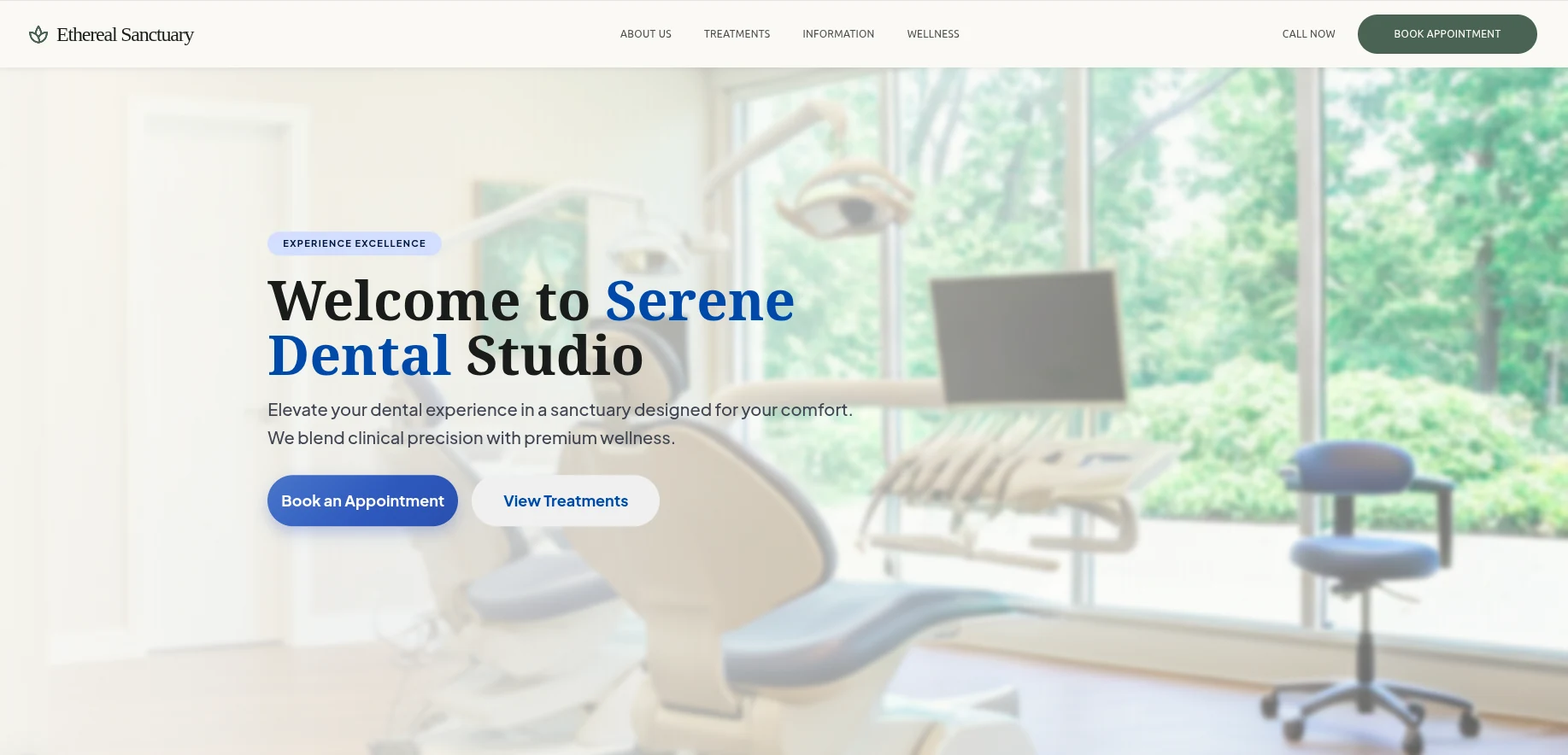
The Ethereal Sanctuary template: a cream, serif-led dental website
Calm and boutique

Ethereal Sanctuary

Soft, unhurried and premium. Suits practices leaning towards wellness.
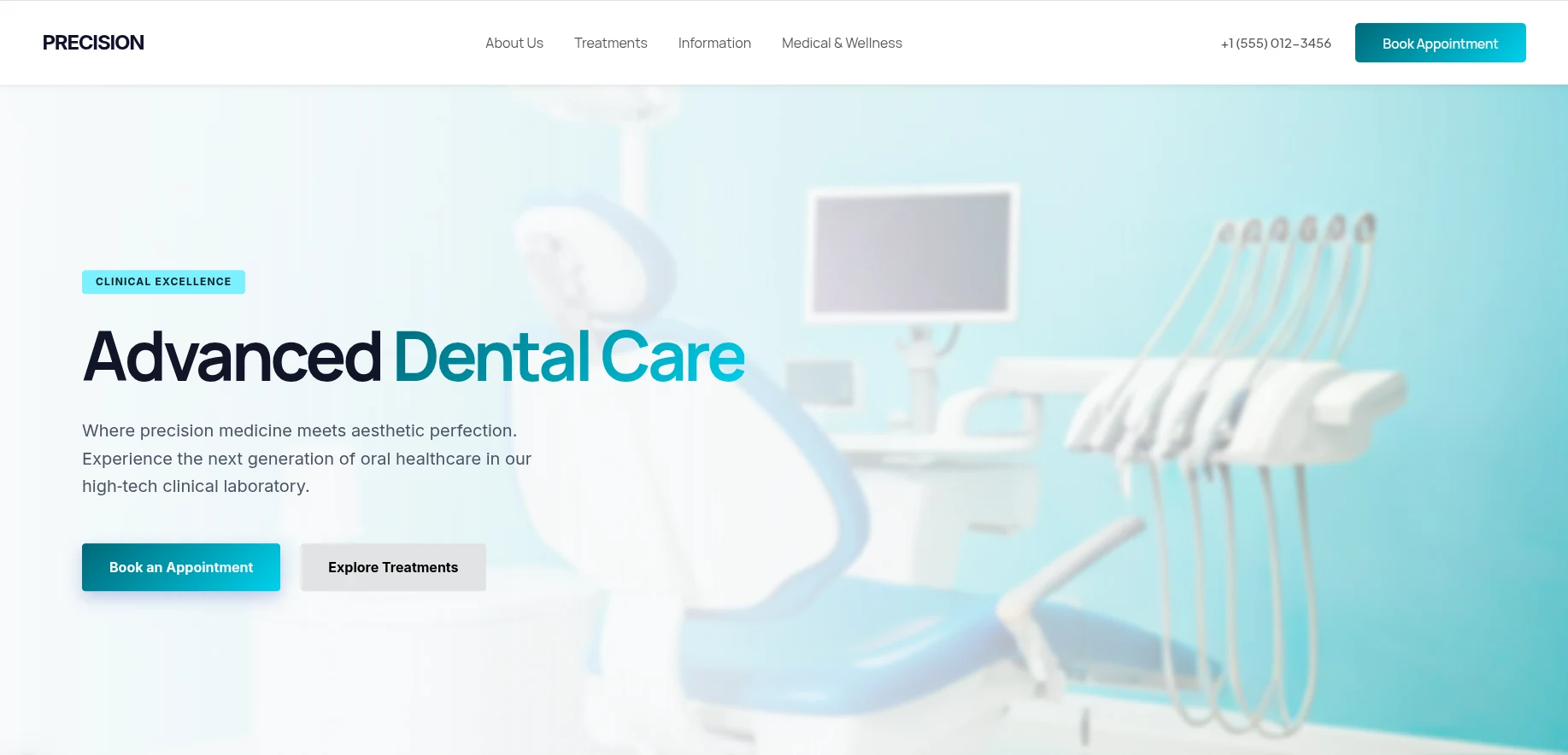
The Precision template: a bright, clinical dental website
Clinical and modern

Precision

Bold type and clean space. Built for implant and cosmetic work.
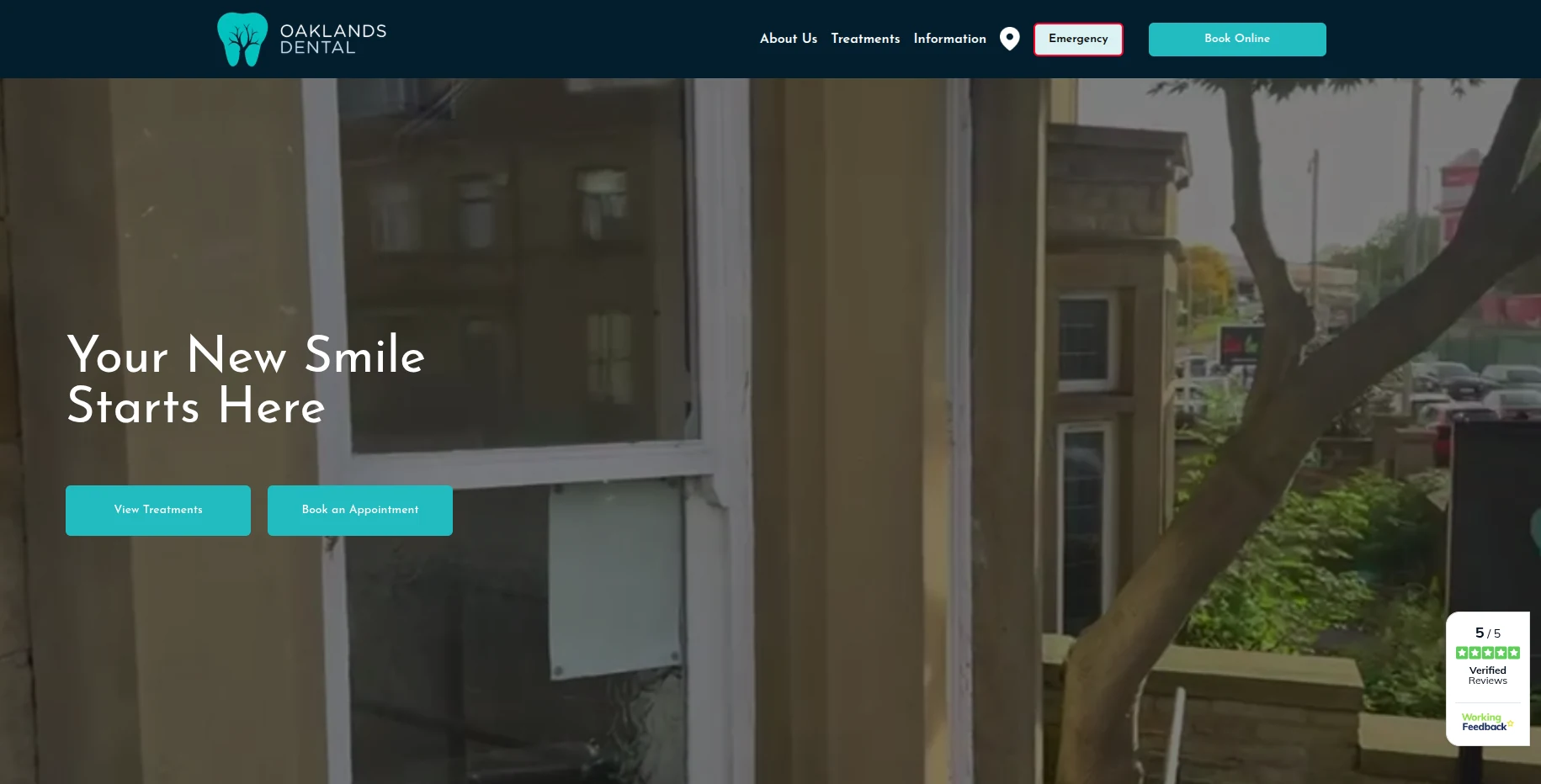
The Oaklands Dental website: dark navy with teal buttons
Dark and confident

Oaklands Dental

High contrast with a strong booking call to action throughout.
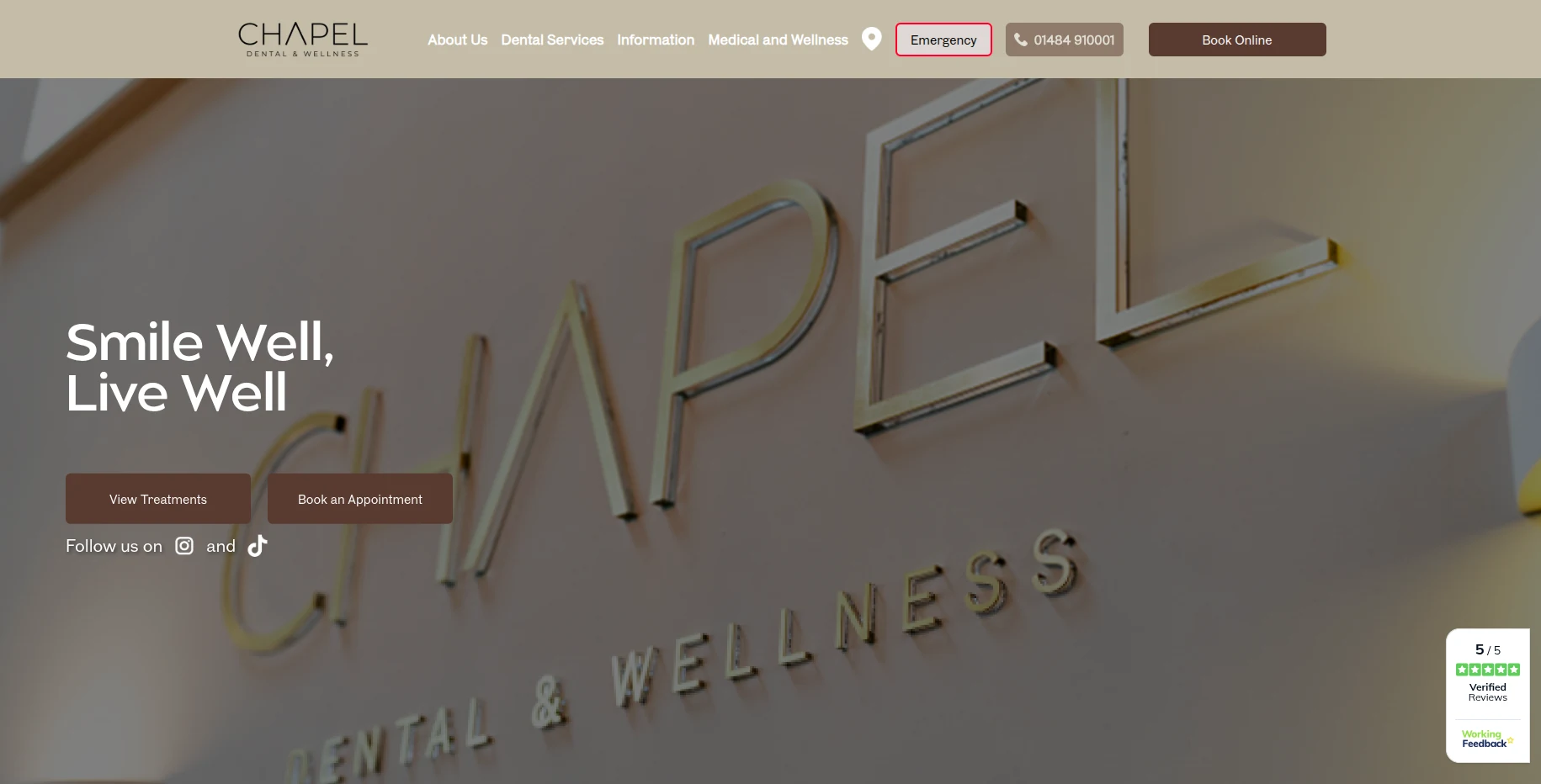
The Chapel Dental and Wellness website: warm tan with brown buttons
Warm and welcoming

Chapel Dental & Wellness

Earthy tones for practices that want to feel like a local fixture.
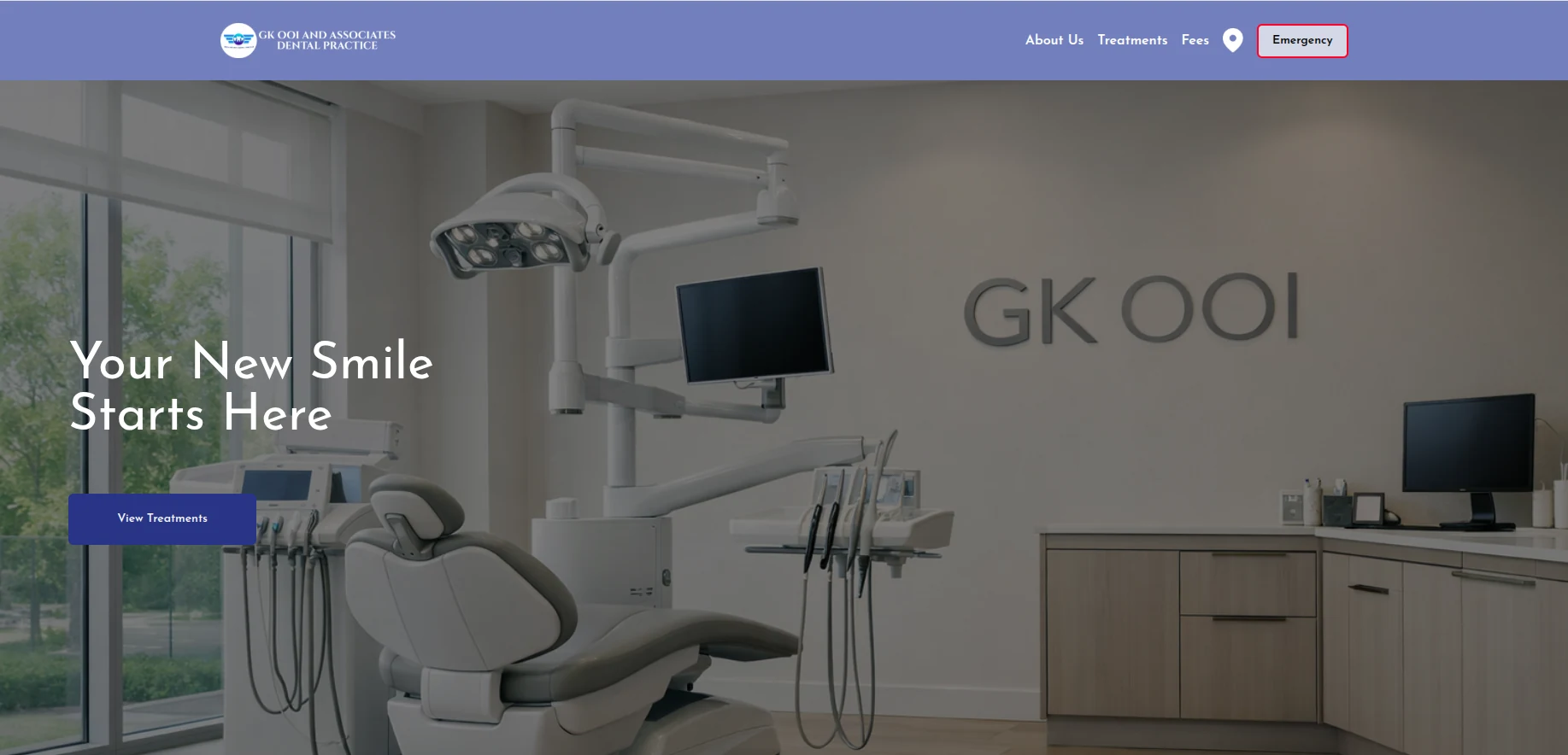
The GK OOI and Associates website: periwinkle header over a clinic photo
Classic and clear

GK OOI & Associates

Straightforward and readable, with the treatment list front and centre.
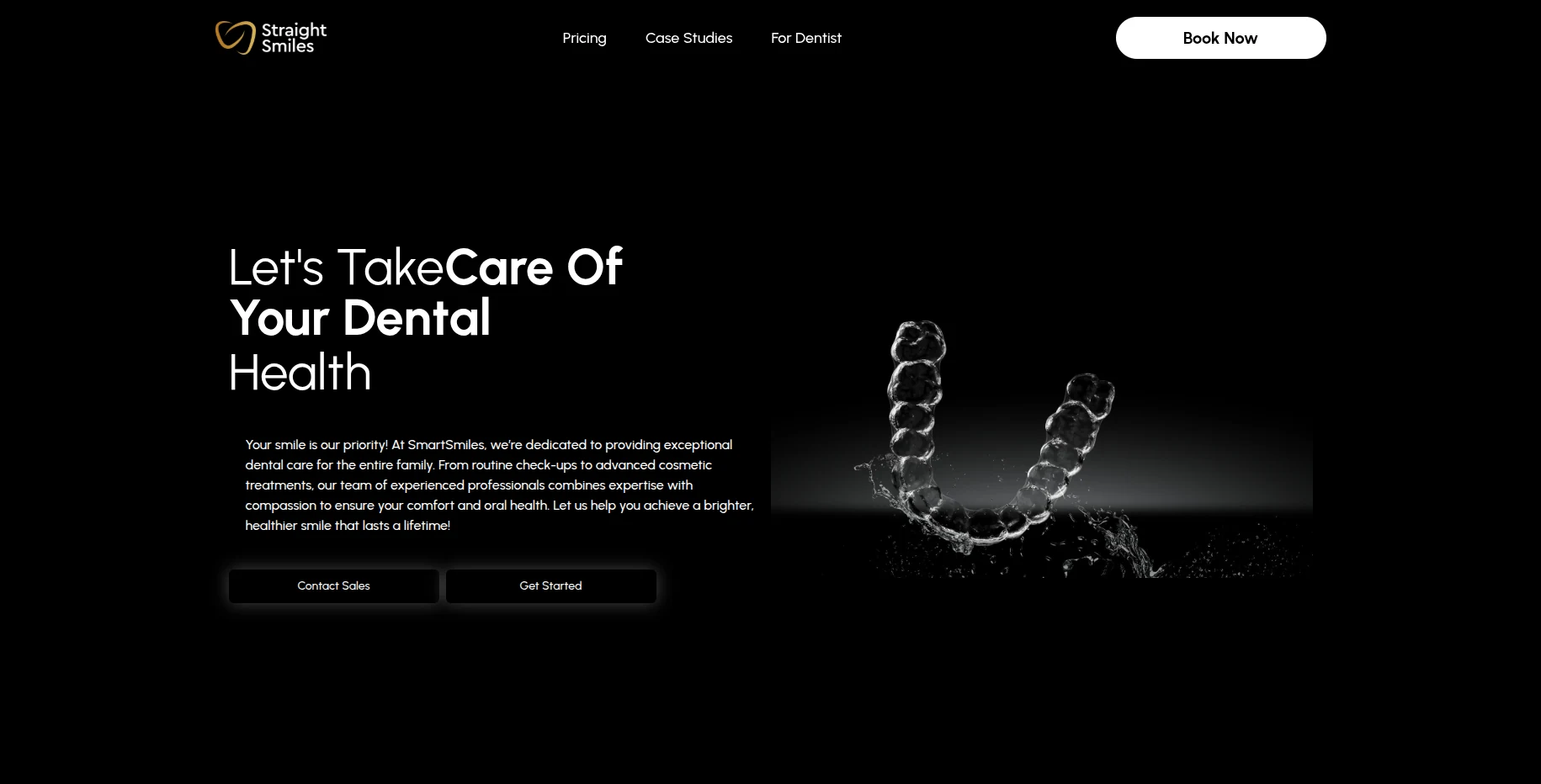
The Straight Smiles website: black with gold branding
Black and premium

Straight Smiles

Editorial and high end. Made for orthodontics and aligner work.

  • Every template carries the same booking, forms and enquiry tools
  • Your logo, colours and fonts throughout
  • Want something else? Ask us to build a template to your own design
Book a demo
Features

Five systems your practice needs. One place to run them.

Each part talks to the next, so nothing gets dropped between your website and your front desk.

Website

A fast, mobile-friendly site on your own domain, built from your branding and ready for search engines.

  • Edit any page yourself, then publish when ready
  • Version history, so you can roll back a change
  • AI helps write and refresh your copy

Booking & Payments

Patients book around the clock by treatment, practitioner and time, and can pay as they book.

  • Live availability per practitioner
  • Card payments through Stripe, into your own account
  • Calendar invite sent with every confirmation

Forms & Consent

Consent forms patients complete and sign on their phone, saved against the record the moment they sign.

  • Reusable templates you write once
  • Drafted for you from your consultation notes
  • Signed forms lock automatically

Lead Management

Every website enquiry becomes a lead with an instant alert, tracked through to a booked patient.

  • A clear pipeline from new enquiry to converted
  • Private follow-up notes on each lead
  • Bring existing contacts in by CSV, or straight from Gmail

Patient Communication

Automatic email reminders and recalls that cut no-shows and bring patients back without anyone chasing.

  • Reminders 48 and 24 hours before the appointment
  • Six-month recalls and no-show follow-ups
  • An AI assistant on your site, answering questions day and night
A closer look

One platform for every part of your day.

The tools your practice uses every day, built to work together.

Lead Management

Every enquiry in one place.

Website enquiries become leads the moment they arrive, with an alert so someone picks them up.
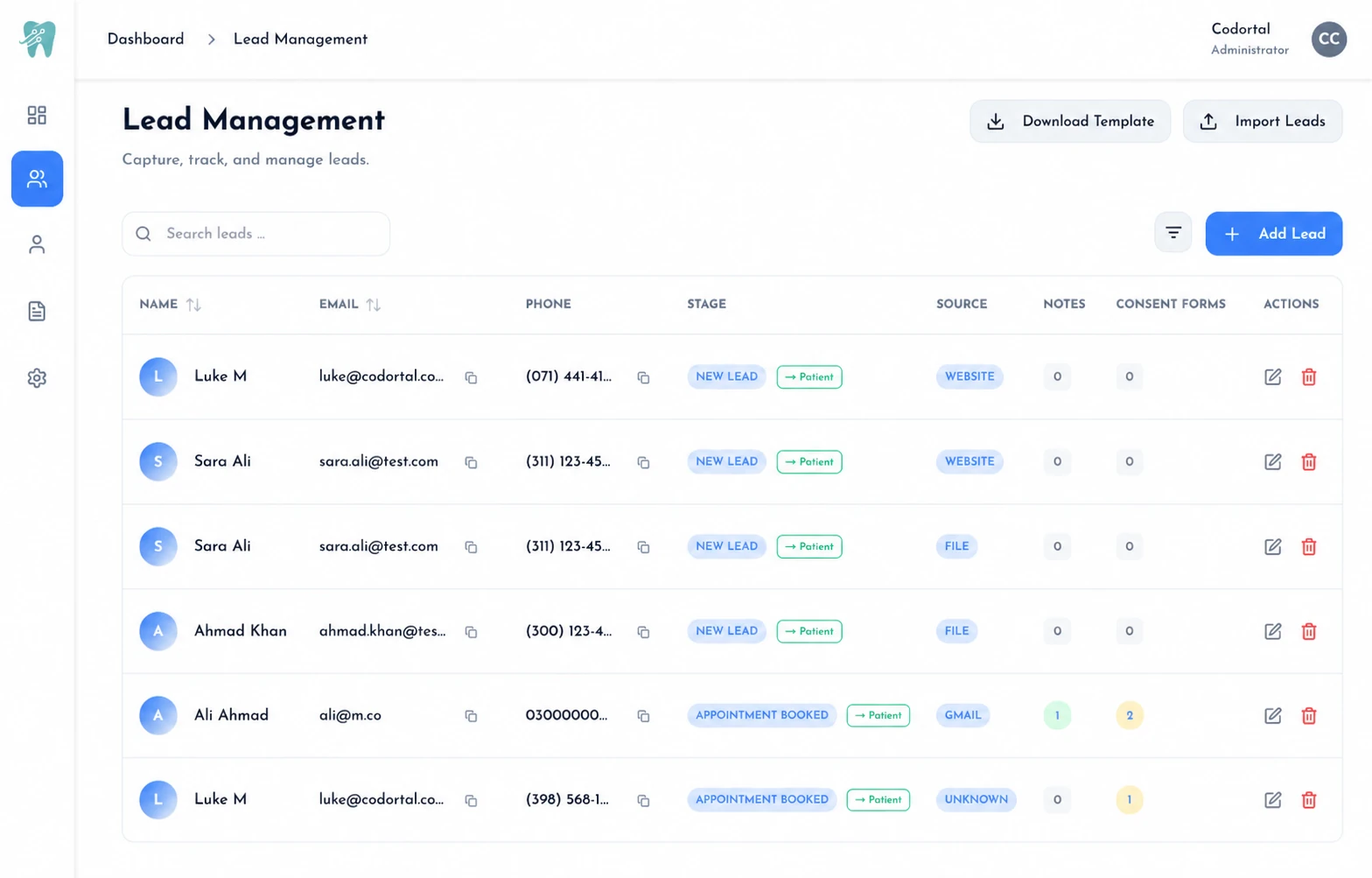
  • Website enquiries captured automatically
  • Instant alerts so you never miss a new patient
  • See new, contacted and booked at a glance
The lead management table showing enquiries at different pipeline stages
Patient Communication

Fewer no-shows, without the phone calls.

Once a booking is confirmed the follow-up runs itself, so nobody has to remember to chase.
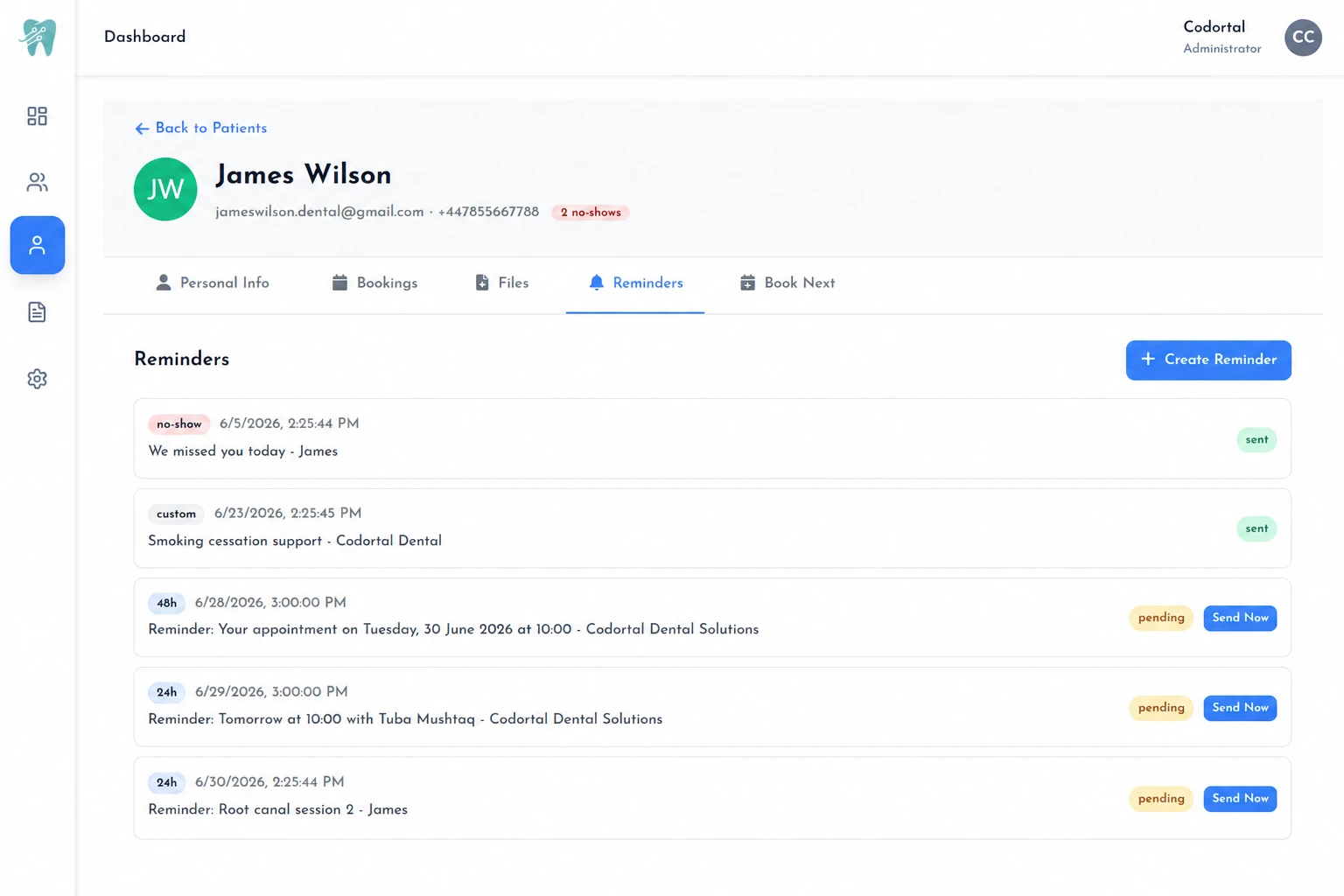
  • Email reminders at 48 and 24 hours
  • Six-month recalls to bring patients back
  • Automatic follow-ups after a no-show
A patient's reminder list showing 48 hour, 24 hour and follow-up reminders
Booking & Payments

Patients book and pay when it suits them.

Patients pick a treatment, practitioner and time from live availability, and can pay as they book.
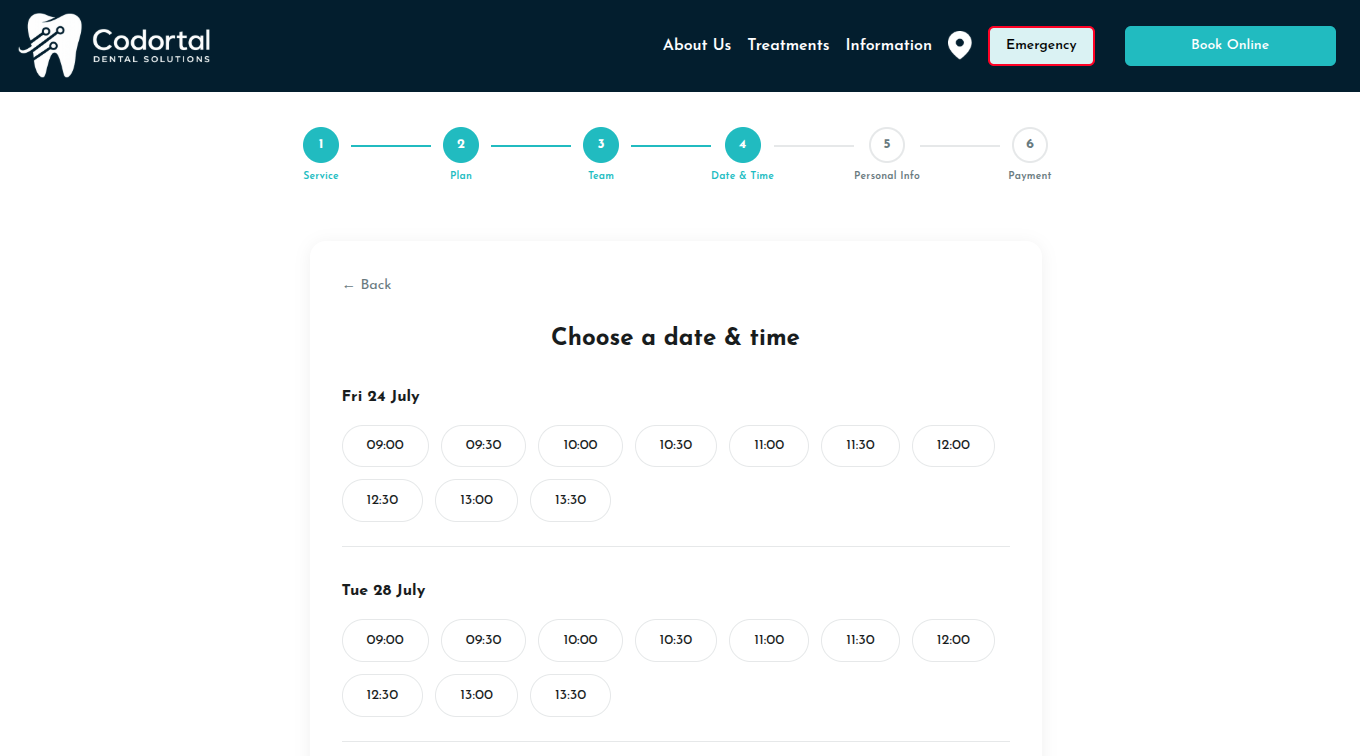
  • Book by treatment, practitioner and time slot
  • Secure online card payments with Stripe
  • Reception stays in control of the diary
Online dental appointment booking calendar with available times
Websites

A website that brings patients in.

A fast site on your own domain that you update yourself, with no waiting on an agency.
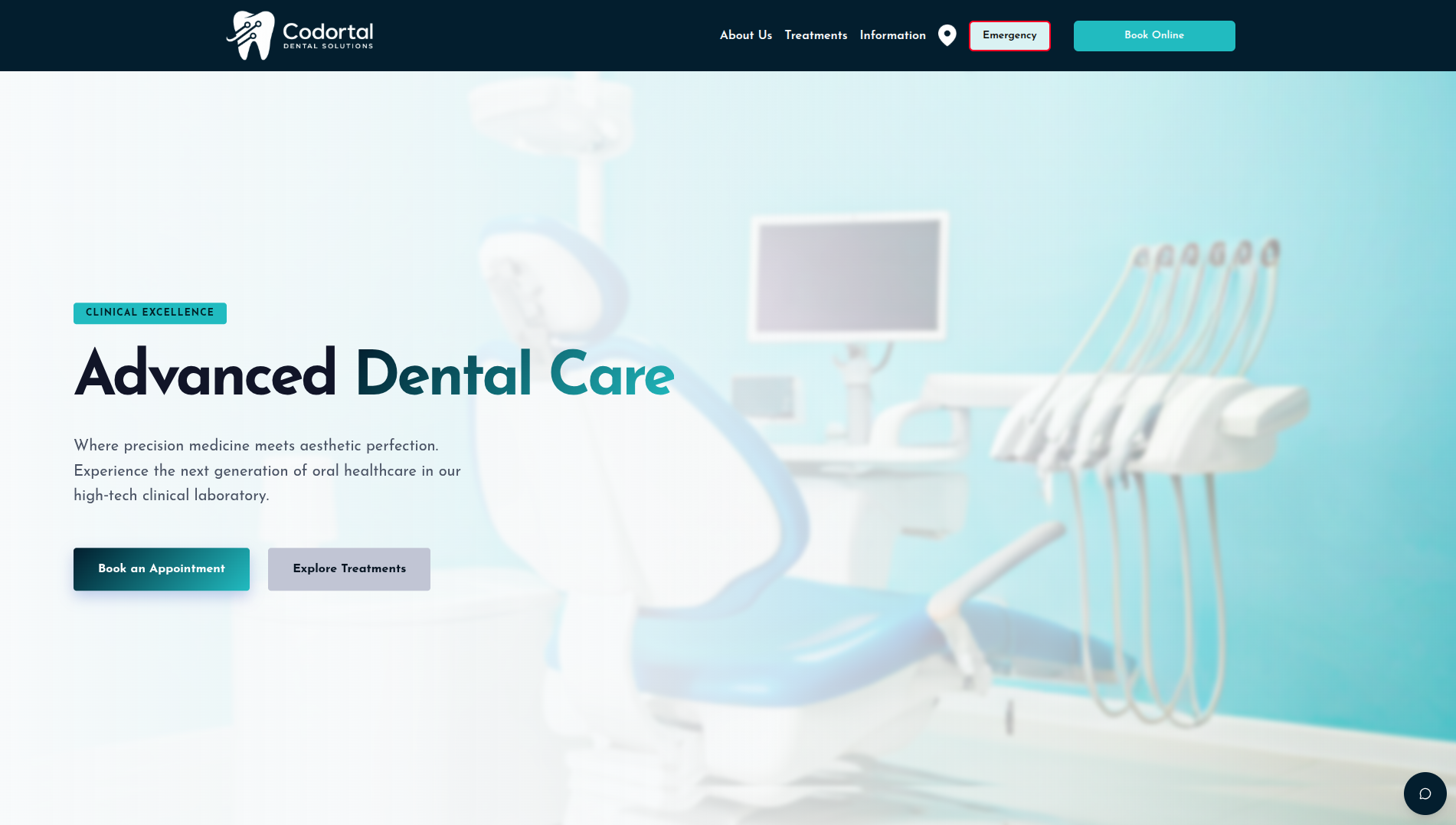
  • Your own branding, colours and domain
  • Search-engine ready to bring in new patients
  • Edit pages yourself: draft, publish, roll back
A modern dental practice website shown on screen
Forms & Consent

The end of paper filing cabinets.

From writing a consent form to having it signed and filed, with nobody printing or chasing anything.

  1. Write and send

    Consent Forms

    Write your templates once, then send one to a patient in a couple of clicks.

    • Reusable templates in a rich text editor
    • Drafted from your dictated or typed notes
    • Patient details filled in automatically
  2. The patient signs

    Digital Signatures

    Patients sign on their phone or in the chair, and the form locks the moment they do.

    • Sign in the practice or at home, on any device
    • Signed and dated into the form itself
    • Locked once signed, stored against the patient
  3. Filed for you

    Automatic Submission

    Nothing gets re-typed. Forms go out, come back signed, and file themselves.

    • Secure one-time links that expire after signing
    • Website enquiries captured as leads automatically
    • Filed against the patient record for you
Integrations

The tools we already plug into.

Codortal handles the whole patient journey itself, and connects to these for the parts it makes sense to.

Dentally

Already taking bookings in Dentally? Keep that diary. Codortal can work with it instead of asking your team to move.

Working Feedback

Your published patient reviews pulled straight onto your website, updating on their own as new ones come in.

Stripe

Card payments at the point of booking, paid into your practice's own Stripe account.

Google & Gmail

Connect your inbox so enquiry emails become leads on their own, filtered by sender or subject.

Calendar invites

Every confirmation carries a calendar file, so the appointment lands in whatever calendar the patient uses.

Email delivery

Confirmations, reminders and signing links sent through a dedicated delivery service so they reach the inbox.

Netlify hosting

Your site is hosted and rebuilt automatically the moment you hit publish. No deploy step to think about.

Third-party integration

Running something else you need Codortal to work with? Tell us on the demo and we will look at it with you.

The patient journey

From first search to their next appointment.

What a patient experiences, and what your team no longer has to do by hand.

  1. Step 1

    Get Found

    A fast, search-ready website on your own domain puts your practice in front of people looking for treatment nearby.

  2. Step 2

    Get Booked

    Patients pick a treatment, practitioner and time from live availability, and pay as they book if you want them to.

  3. Step 3

    Go Paperless

    Consent forms and signatures are done on the patient's phone before they arrive, saved straight to their record.

  4. Step 4

    Stay Connected

    Confirmations, calendar invites and reminders at 48 and 24 hours go out on their own, so fewer people forget.

  5. Step 5

    Grow & Retain

    Six-month recalls bring patients back, and every new enquiry is tracked through to a booking.

Why Codortal

Running a practice shouldn't mean running multiple systems.

Five things a practice deals with every day, and what changes when they stop living in separate systems.

Traditional setup With Codortal
New enquiries

A patient calls or messages, nobody gets back in time, and they book down the road instead.

Every enquiry lands as a lead with an instant alert, tracked until someone has actually followed it up.

Front desk admin

Reception loses hours to phone tag, paperwork and copying details from one system into another.

Patients book, pay and sign themselves. Reminders go out on their own. Nothing gets re-typed.

Your website

A slow, dated site you have to email an agency to change, and wait a week for.

Edit any page yourself, preview it, publish when you are happy, and roll back if you change your mind.

Consent and history

Printed forms that get signed, scanned, filed, and then cannot be found when you need them.

Signed on the patient's phone before they arrive, locked once signed, saved to their record.

What it costs you

A website agency, a booking tool, a payment provider and a spreadsheet, each billed separately.

One subscription, one login, one company to call when in doubt.

Five systems become one. Most practices are live within a few days.

Book a demo
Getting started

Choose, customise, launch.

Three steps from picking a design to a live website on your own domain.

  1. Step 1

    Choose

    Pick the template that fits your practice. Every one is built for dental, so none of them needs rescuing first.

  2. Step 2

    Customise

    Add your logo, colours, treatments and team. Edit any page yourself and preview every change before it goes anywhere.

  3. Step 3

    Launch

    Publish to your own domain. Booking, forms and enquiries are already wired in and working from day one.

Pricing

Straightforward plans that grow with you.

No setup fees, and your own domain and branding throughout.

Pro

Practices that want the changes made for them, not by them.

£119/ month
Book a demo

Everything in Growth, plus:

  • Unlimited website changes, made by us
  • Ongoing content updates
  • Monthly SEO improvements
  • Unlimited WhatsApp support
  • Priority response times

Enterprise

Groups and multi-site practices with their own requirements.

Custom
Talk to us

Everything in Pro, plus:

  • Multiple locations under one account
  • Bespoke integrations with your existing tools
  • A dedicated account manager
  • Reporting built around how you measure things
Testimonials

What dental teams say about us.

Practice owners and managers on what changed after switching to Codortal.

Our new patient enquiries have gone up massively, and nothing slips through the cracks any more. It just works.

ACDr. Amelia ClarkePractice Owner
The practices already running on Codortal
Oaklands Dental
Chapel Dental
GK OOI Dental
Good to know

Questions we hear a lot.

Everything about getting set up, staying secure and running your practice on Codortal.

How quickly can we go live? +
Most practices are live within a few days. After a short call we build your website, set up online booking, consent forms and patient enquiries, and walk you through going live.
Do we have to change how we already work? +
No. Codortal fits around your existing routine and your reception team stays in control of the diary. If you need Codortal to work alongside another system, that is something we look at case by case on our Enterprise plan.
Are the consent forms GDPR-ready? +
Yes. Consent forms are completed and signed online, then stored securely to meet UK GDPR, so nothing is left sitting in a filing cabinet.
Is there a setup fee? +
No. There's no setup fee.
Does this work for mixed NHS and private practices? +
Yes. Codortal works for private practices and for mixed NHS and private practices across the UK, whatever your patient mix.
What's included in a Codortal website? +
A fast, mobile-friendly website on your own domain, built from your own branding, text and images. Online booking, enquiry forms and payments are built in, and you can update any page yourself.
Can we use our own domain name? +
Yes. You can connect a domain you already own or register a new one, and your site deploys to it automatically whenever you publish.
Can patients book appointments online? +
Yes. Patients choose a treatment, practitioner and time from your live availability, day or night, and the request comes through for your reception team to confirm.
Can patients pay online when they book? +
Yes. Patients can pay securely by card as they book through Stripe, and a successful payment confirms the appointment automatically.
Are online payments secure, and where does the money go? +
Payments run through Stripe on your practice's own account, so card details are handled securely by Stripe and funds go straight to you. Failed or abandoned payments are handled automatically.
Do patients get automatic appointment reminders? +
Yes. Every confirmed booking sends a calendar invite plus automatic email reminders, and we send six-month recall reminders too, which helps cut no-shows and bring patients back.
What happens to enquiries from our website? +
Every website enquiry is captured automatically as a lead with an instant alert, so your team can follow up quickly and track each one through to a booked patient.
How do the digital consent forms work? +
You send the form and the patient gets a secure one-time link. They read it and sign on their phone before the visit, and once signed the form locks and saves against their record.
How does the AI help with consent forms? +
Write or paste your consultation notes and the AI drafts the consent form from them, using your own template and the patient's details. You review and edit it before it goes out, so you spend less time writing and more with the patient.
How does the AI chatbot know about our practice? +
The website assistant answers patient questions around the clock using only your practice's own information: your services, prices, opening hours and team. It always points patients towards booking.
How is our patient data kept secure? +
Patient and clinical data is encrypted at rest, access is role-based, and changes are audit-logged. It is built to meet UK GDPR.
Can we edit the website ourselves after it's live? +
Yes. You edit content, branding and images in your own portal, preview every change, and publish when ready, with version history so you can roll back any time. AI can even help rewrite your copy.
Do we need any technical skills to run it? +
No. We set everything up for you and the editor is designed for busy practice teams, not developers. Support is on hand whenever you need it.
Can we keep our own branding and colours? +
Yes. Your logo, colours, fonts and content are used throughout, so your website and patient forms look like your practice, not a template.
Can we import our existing patient and enquiry lists? +
Yes. You can bulk-import existing enquiries and contacts so your team can pick up follow-ups from day one.
What support do we get when we join? +
We handle onboarding and setup, get you live, and stay on hand once your team is using it day to day.
Book a demo

See Codortal running your practice.

We will walk you through the platform with your treatments, your team and your patients in mind, then answer whatever you want to ask.

  • A 20 minute call, at a time that suits you
  • We set the platform up around your treatments and your team
  • No obligation, and no setup fee if you go ahead

